February 24, 2024

May 21, 2015
Food Revolution Day 2015
When I read about Jamie Oliver's campain to put compulsory practical food education on the school curriculum (Read more at http://www.foodrevolutionday.com/campaign/#10iM1DV3ojtd6xj2.99), I did not hesitate a second to sign his campaign and hurried to see what ideas and materials he offers on the project page, for schools to get involved.
My 12 year old students were not sure they would like Jamie's "Squash it sandwich" better than their usual sandwiches they eat at school, but they agreed to learn more about the ingredients and give it a try.
So, we learned all the vocabulary to understand the ingredients, the equipment we need and the procedures to prepare Jamie's healthy sandwich. For homework, students had to learn to spell the words and bring some of the fresh ingredients we needed.
We put two desks together, covered them with a nice clean tablecloth, arranged all the equipment, watched the video with Jamie preparing the sandwich and then tried to do the same.
Some of the students were not convinced when we started that they would eat the sandwich. We even had an alternative: a group of girls prepared a fresh fruit salad for the dessert.
 The sandwich was a success and the comments varied from "Delicious! " and "Yummy!" to "Better than expected!" and "Not bad!" from a few students. The good thing is they all ate the sandwiches.

We learned a lot of about healthy and unhealthy food, in a fun way.
My 12 year old students were not sure they would like Jamie's "Squash it sandwich" better than their usual sandwiches they eat at school, but they agreed to learn more about the ingredients and give it a try.
So, we learned all the vocabulary to understand the ingredients, the equipment we need and the procedures to prepare Jamie's healthy sandwich. For homework, students had to learn to spell the words and bring some of the fresh ingredients we needed.
We put two desks together, covered them with a nice clean tablecloth, arranged all the equipment, watched the video with Jamie preparing the sandwich and then tried to do the same.
Some of the students were not convinced when we started that they would eat the sandwich. We even had an alternative: a group of girls prepared a fresh fruit salad for the dessert.


We learned a lot of about healthy and unhealthy food, in a fun way.
May 2, 2015
HUPE Conference 2015
23rd Annual HUPE Conference was a perfect event for all teachers lucky to be in Solaris Beach Resort, Šibenik, Croatia,for the weekend 24-26 April 2015.
The venue was beautiful, everything was perfectly organized. There were more than 60 talks and workshops given by local and international speakers, six plenary speakers. More than 400 teachers participated in this ELT event. In the breaks teachers could visit the exhibitors and meet old and new friends.
HUPE Conference was a great weekend of professional development and fun.
This is the presentation that accompanied my talk at the the conference.
Here are some photos of the place and the people I had the privilege of meeting during the conference this year.
The venue was beautiful, everything was perfectly organized. There were more than 60 talks and workshops given by local and international speakers, six plenary speakers. More than 400 teachers participated in this ELT event. In the breaks teachers could visit the exhibitors and meet old and new friends.
HUPE Conference was a great weekend of professional development and fun.
This is the presentation that accompanied my talk at the the conference.
Here are some photos of the place and the people I had the privilege of meeting during the conference this year.
April 14, 2015
Joy Egbert’s Engagement Principles
Sunday’ plenary was exactly what teachers in a lot of
contexts need nowadays – a beautifully put reminder that technology is not the
magic wand that the teacher uses to ensure students are learning. Instead of
the technocentric approach, Joy Egbert proposes five principles of task engagement,
careful studying of one’s students, their strengths and weaknesses, and the
technology that is available and will best engage the students as well as
improve the learning process.
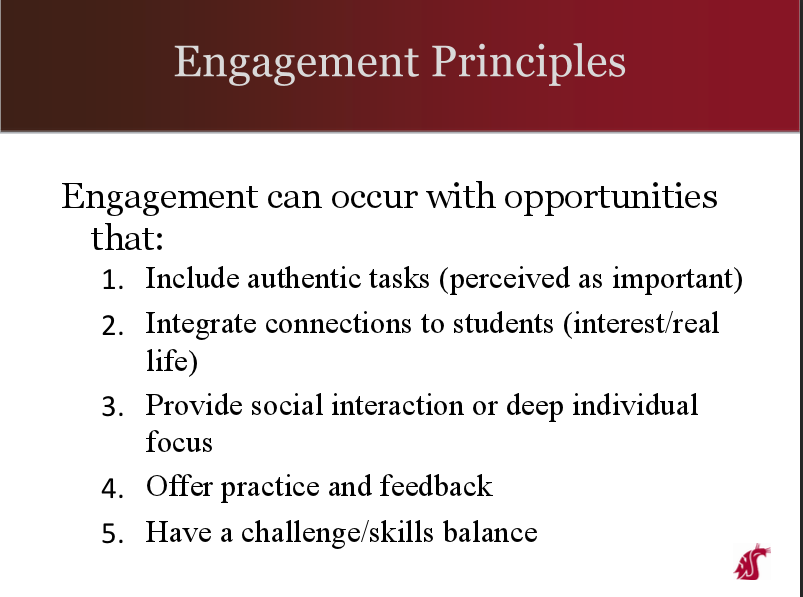

Technology can never be central in the process,
teachers must be aware of their central position. The role of the teacher is as
important as before the time of technology if not even more important when
technology is involved in the learning process. I couldn’t agree more.
April 12, 2015
IATEFL Online

The Annual International IATEFL Conference & Exhibition is in full swing but I am one of a large number of teachers who did not get the chance to travel to Manchester. I have been too busy since its start on Friday and I have not seen any of the sessions yet.
Luckily, there is IATEFL Online to save the day today and even it is early in the morning now and the conference programme for today starts only in a few hours, I am fully participating in the confrerence - IATEFL Online is the right place not only to watch the recordings and catch up with the events I missed but to choose an interview with a person important in the world of ELT and watch it any time I want, read a post of one of the roving reporters, or to plan my participation in the conference for today.
IATEFL Online seems organized in the same way the online editions of the conference was last year and the year before when I was one of the roving reporters (happy memories of Liverpool!).
To get the full picture of all the events at the conference, the best thing is to join the conference on Facebook and Twitter, too. It can be done from the IATEFL Online page. Done!
Now, I can check what I have missed. A cup of coffee is in the hand. Hello, conference!
April 26, 2014
HUPE Day 2 in the wonderful world of words
It's Day 2 of HUPE Annual Conference in Opatija, the day of my presentation. I know there might be some more more important and more valuable speeches and workshops going on at the same time, but this is my blog and this post is about my presentation.
Here it is for all who asked me to share it. Thank you for coming to all who were there in Hall B Volta. I hope you find some useful ideas in it and don't forget to share your own ideas.
Here it is for all who asked me to share it. Thank you for coming to all who were there in Hall B Volta. I hope you find some useful ideas in it and don't forget to share your own ideas.
HUPE Annual Conference - Day 1

Arrival:
Opatija looks great, it's almost summer and there are a lot of tourists, dressed in summer clothes, walking around the town, some even soaking their feet in the sea water while enjoying the sun. It is more than I'd expected when I was hurrying, trying to avoid using umbrell,switching from the car to the coach, to join a group of teachers travelling together to the conference from Zagreb. Most of us are in jackets, waving our umbrellas. I feel like I am in heaven and can't wait to adapt to the local ways.

At the hotel:
The hotel is fully prepared for all the teachers coming from different parts of Croatia and abroad. Everything runs smoothly. Thank you, organizers. The HUPE volunteers are the best!

The conference starts:
In the afternoon the opening ceremony is nice, not too long, the president's speech well balanced - he does not forget anyone he has to thank and I feel welcomed. It looks like HUPE is going to survive our first male president and he is not going to be remembered for that only :)
The first plenary:
"Living and Learning at Intersections", was interesting, informative and offered the teachers a lot of food for thought. Ms Olinka Breka shared with us her thought about the teacher's role in the 21st century, the need to embrace the change in order to be the kind of teacher to educate the new generations of learners, the need to use the language not only as a way of communication but also an expression of culture, to teach about culture and to educate the heart. The right topic and very well presented, too.
Looking forward to hearing what tomorrow's plenary speaker has prepared for the teacher. This conference has started very well. In the meantime, off to take part in some workshops and see what the colleagues have been up to. Good luck to all of us!
April 3, 2014
Harrogate Online - Day 1
A full day of teaching is behind me. Still feeling a bit envious of the colleagues who are now in Harrogate, attending the 48th Annual International IATEFL conference, after I have seen all the photos taken by the delegates and shared in IATEFL Facebook group. The conference is an opportunity to meet colleagues you only know online or don't know at all but you share the same interests, as well as to spend some time with colleagues who live and work in different countries of the world and you meet some of them only at conferences, if you are lucky to attend. Luckily for me, for all other reasons for attending the conference, there is Harrogate Online. I have just enough time to check today's events before going to sleep.
Harrogate Online can really help you feel part of the conference. Live coverage starts each day from 9.00 UK time. There are also live studio interviews with conference presenters and delegates. Roving Reporters section looks different from the last year's edition when I was one of the reporters. This year all the delegates are invited to contribute reports. After the first day there is one report of a session about teacher motivation. Nice. Forums are there, too.
Day 1 Sessions: I can watch a video of the plenary session by David Graddol and nine more talks/workshops - all recorded and accompanied by the information about the presenter, the venue and the length and downloadable presentations. Isn't this great? Unfortunately, it wouldn't be wise for me to stay up all night because I teach in the morning. I must choose only one (plus one interview?)
Decisions, decisions! I'll leave the plenary for tomorrow and I watch these two:
There are eight recorded interviews from yesterday and 15 done today! I want to listen to all of them but I must choose one for tonight and it will be Ann Foreman and Paul Braddock who talk about their work on Teaching English. I love the website and I can't wait to hear the interview.
Here it is:
Harrogate Online can really help you feel part of the conference. Live coverage starts each day from 9.00 UK time. There are also live studio interviews with conference presenters and delegates. Roving Reporters section looks different from the last year's edition when I was one of the reporters. This year all the delegates are invited to contribute reports. After the first day there is one report of a session about teacher motivation. Nice. Forums are there, too.
Day 1 Sessions: I can watch a video of the plenary session by David Graddol and nine more talks/workshops - all recorded and accompanied by the information about the presenter, the venue and the length and downloadable presentations. Isn't this great? Unfortunately, it wouldn't be wise for me to stay up all night because I teach in the morning. I must choose only one (plus one interview?)
Decisions, decisions! I'll leave the plenary for tomorrow and I watch these two:
There are eight recorded interviews from yesterday and 15 done today! I want to listen to all of them but I must choose one for tonight and it will be Ann Foreman and Paul Braddock who talk about their work on Teaching English. I love the website and I can't wait to hear the interview.
Here it is:
December 27, 2013
Eleven
I've been tagged in a blogging meme Eleven
by my dear friend Arjana Blažić.
This is how the challenge works:
This is how the challenge works:
- acknowledge the nominating blogger.
- share 11 random facts about yourself.
- answer the 11 questions the nominating blogger has created for you.
- list 11 bloggers.
- post 11 questions for the bloggers you nominate to answer, and let all the bloggers know they have been nominated. Don’t nominate a blogger who has nominated you.
11 random facts about me:
- My two sons are two most important persons in my life.
- I like to read or watch a good mystery
- I love growing my own herbs.
- One of my New Year's resolutions every year is to start a new diet.
- I am thinking seriously of changing no. 3 because it never works.
- I love teaching in a school in my neighbourhood.
- I have found out why a number of old age pensioners I sometimes meet in my neighbourhood say hello like they know me when we meet: they sometimes bring their grandchildren to school. Their grandchildren are not in any of my classes and it took me some time to realize who they are.
- I am not very sporty but I love
swimming in the
- If I lived somewhere on the coast I'd try to go swimming all year round like I see some people do. I envy them a little.
- I believe virtual worlds can be used for learning a foreign language. I even have a certificate for teaching in Second Life.
- I like planning both teaching and other activities even if I know I am not going to stick to the plan. Planning makes improvisations more fun.
My answers to Arjana's questions:
1) What is your favourite book?
I don't think it is one book. When I read
a book, even if I don't like it at first, I keep reading to see what's in it
for me.
2) How much time on an average day do you spend online?
Much more than I would like to confess.
3) iPad or Android tablets?
There is an Android, usually somewhere around the
living room, but I almost never use it.
4) What do you consider the most valuable thing you own?
I don't care much about how valuable things are as
long as they serve the purpose and I like them.
5) What is your favourite way to waste time?
Lying in the sun with a paper book in hand
6) If a movie was being made about you
who would you choose to play you and why?
Too difficult to imagine :)
7) If you could have an endless supply of food what would that be?
Fresh fruit – nicely arranged in big bowls or baskets,
none the same as the previous
8) What's the best holiday you've been on?
I guess it was when I was a child and used to spend a
week or so with parents, brother and sister on a boat or a campsite next to the
most beautiful sand beach. I miss the peace and quiet and the simple life of
the time that is hard to find nowadays.
9) What's the worst haircut you've ever had?
It was when I decided to stop dying hair and to
keep it short and grey like it is now. My hairdresser showed a lot of inventiveness
and a lot of people actually thought I wanted my hair to be in two almost
opposite colours. I knew the truth and thought it was awful.
10) What three things do you love most about your best friend?
easy-going, honest and positive
11) What is your favourite smell and what memory does it remind you of?
Lemon tree in blossom - I find myself opening the window in the
morning in my parents' house. It smells great and I remember it combined with
the picture of a beautiful tree and the blue sky. I try to find it in perfumes and other
cosmetic products because it makes me calm and happy.
Thank you, Arjana, for tagging me and for this very interesting set of
questions.
My set of participants - I tag:
And
I'm looking forward to your answers to my 11 questions:
- What are you going to do differently in the new year ( at least during the first month)?
- If you could get a free ticket to any destination in the world, where would you like to go?
- If you could choose to live all year in one season, would you choose winter or summer?
- What do you find hardest to teach your students?
- What do you like about the space where you teach (your classroom)?
- Which is most important quality you look for in a community of practice you belong to
- If you weren't a teacher, what would you do?
- What is the best way to share what you learn about teaching?
- What do you never go to work without?
- Can you think about and share one thing that people usually don't know about the part of the world where you live?
- If Santa was to bring you only one gadget you can use for teaching or in your free time, what would you wish for?
Happy holidays everybody!
Three most important elements of CoPs
I have been asked to write three most important reasons that make me appreciate a community of practice, why I find some communities more useful to my needs as a teacher than others.
I believe that three main elements that are essential in a CoP are:
- It is a group of people coming from various backgrouds, with various levels of expertise in teaching, both mentors and mentees. It is important because it makes it possible to see every problem from different angles and get different perspectives. Every discussion is more fruitful.
- The atmosphere is the one of collaboration and sharing, the willingness to help and ask for help. Even if there are differences in age and expertise, teachers don't feel they will be asking a stupid question if there is anything they need help with.
- Most of the teachers are active. They care about the community and believe in the power of the community: projects are started, surveys done, papers read and discussed, members comment on one another's blogs and it is easy to get feedback.
These are my two cents :)
I am looking forward to reading other teachers' opinions.
March 27, 2013
Blogathon 2013
British
Council organised a blogging competition on their webpage for English teachers,TeachingEnglish.
It was a blogging marathon for English
teachers from Armenia, Bulgaria,
Croatia, Cyprus, Hungary, Israel, Romania, Russia, Spain and Uzbekistan.
Blogathon lasted for a month, from 4th February until
4th March. English teachers created blogs on TeachingEnglish and wrote
Blogathon posts not longer than 250 words, read and commented on other
participants' posts.
The blog
entries made reference to a variety of ELT themes and class activities. A lot
of interesting and original content was shared. All bloggers were very positive
and respectful. It was interesting to take part in various discussions on the
usual ELT topics but also to learn about
different teaching situations and problems.
After the
end of the Blogathon, British Council
team chose the winners. Three teachers got the first prize – the participation
at the IATEFL annual conference in Liverpool
- as roving reporters.
All my
Blogathon posts can be read on bsanja'sblog on TeachingEnglish, but also on Blogathon page of this blog, because I'd
like to keep them in my diary, too.
I'm very
happy and excited to be one of the teachers travelling to Liverpool on 7 April.
Subscribe to:
Posts (Atom)