Social neworks are beatiful places where teachers can learn on Sunday evening: Arjana Blazic and Eva Büyüksimkeşyan shared a very interesting post from "Life Feast", a very interesting blog by Ana Maria Menezes, about a writing tool - Max My Dream
In Max My Dream you write your dream in 140 characters and wait for a few seconds. Then you can watch your dream animated, you can send it to a friend with a short note inviting your friend to send you a dream, too, or you can share it on facebook or twitter.
I couldn't resist. This is my dream:
In her blog post Ana Maria suggests some ideas for the use of the tool with students.
I'm going to share this dream with my students on our class blog, because this dream incudes them and my dreams about their future work. I'll have them guess my original words. I'll also invite them to choose a topic we discussed in class to express their opinion, their dream, about it.
I can't wait to see what they are going to post.
February 27, 2011

February 23, 2011
February 20, 2011
Only a Game – Lessons in Safer Internet for Children
I started a series of lessons with my sixth graders with the aim of teaching them to feel more comfortable using the Internet and preparing a short drama piece to present as our class contribution to the annual celebrations of our School Day in May.
I found this new activity for teachers on Childnet page and wrote to the authors to get the complete script because it looked just the right kind of material for my 12 – year – old girls and boys. I got it and started immediately working on it with my students.

The scene is very simple: two desks with computers and one big screen in the background. The main characters are two students who live in very different families and go to the same school.
Alex envies Jay because Jay has his new computer in his bedroom and can play whatever games he wants whenever he wants. Alex's parents are strict, his computer is in the front room and the parents decide when and how long he plays on it.
Jay's older friend Taylor persuades him to start playing a new “cool“ game pretending to be fourteen years old and he is soon in trouble when he realizes he has to disclose his personal information to claim the prize and various pop-up messages keep appearing on his screen. He is also in trouble at school because he didn't do some homework that he forgot about because of the game.
The drama comes with three lesson plans and I have already had two lessons with my students.
• In the first lesson we talked about their experience of using the Internet at school and at home, named their favorite games. It was very exciting to see how all students, even the weaker ones, wanted to share their thoughts and experience. Then we read the script and discussed what we learned from Jay's experience.
• The script is in English, it's a foreign language for my students and they'll need some time to learn their lines, but they are so excited they all applied for different roles of real or virtual characters.
Now we are at scene three when Jay starts playing the new “cool“game pretending to be older. Here we have to create our own setting, our own virtual characters that will appear on the stage, their appearance, costumes, background sounds of the game, too. The students are so excited I had to allow some more time for all group ideas to be presented and we'll decide next week on our scene, and, I hope, proceed to the following scenes.
• I hope everything will go smoothly, with only the learning of the language and proper pronunciation until the last scene. There isn't much text and the students understood and discussed it already.
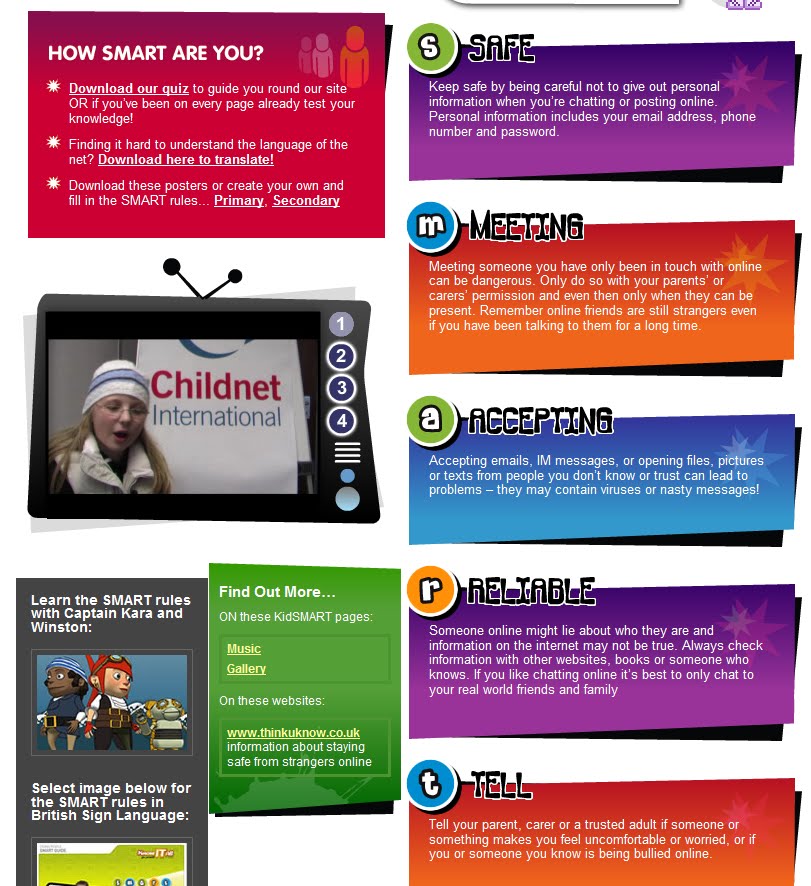
Then in the last scene we have to create our own advice for Jay. I plan to use Childnet SMART rules again. My students are already familiar with the rules: S – safe, M – meet, A – accept, R – reliable, T – tell. I plan to use the Kidsmart presentation and remind them of the rules, have them work in pairs on every detail of Jay's problem and then present their advice to the group. Then we'll agree on all the individual sentences of our advice that go into our script. I also hope to have time to get students to write all the pieces of advice on big posters to keep on the walls.

• The final scene of the play is to be a rap song, possibly with dance. I'll leave it to the imagination of my students and correct only the language.
I'm very excited and can't wait to put our drama on stage. I've been even happier since a few parents reported having talked about the topic with their children because the child was very excited about our work at school and wanted to share the details with parents. It looks like it's going to be a success.
I found this new activity for teachers on Childnet page and wrote to the authors to get the complete script because it looked just the right kind of material for my 12 – year – old girls and boys. I got it and started immediately working on it with my students.

The scene is very simple: two desks with computers and one big screen in the background. The main characters are two students who live in very different families and go to the same school.
Alex envies Jay because Jay has his new computer in his bedroom and can play whatever games he wants whenever he wants. Alex's parents are strict, his computer is in the front room and the parents decide when and how long he plays on it.
Jay's older friend Taylor persuades him to start playing a new “cool“ game pretending to be fourteen years old and he is soon in trouble when he realizes he has to disclose his personal information to claim the prize and various pop-up messages keep appearing on his screen. He is also in trouble at school because he didn't do some homework that he forgot about because of the game.
The drama comes with three lesson plans and I have already had two lessons with my students.
• In the first lesson we talked about their experience of using the Internet at school and at home, named their favorite games. It was very exciting to see how all students, even the weaker ones, wanted to share their thoughts and experience. Then we read the script and discussed what we learned from Jay's experience.
• The script is in English, it's a foreign language for my students and they'll need some time to learn their lines, but they are so excited they all applied for different roles of real or virtual characters.
Now we are at scene three when Jay starts playing the new “cool“game pretending to be older. Here we have to create our own setting, our own virtual characters that will appear on the stage, their appearance, costumes, background sounds of the game, too. The students are so excited I had to allow some more time for all group ideas to be presented and we'll decide next week on our scene, and, I hope, proceed to the following scenes.
• I hope everything will go smoothly, with only the learning of the language and proper pronunciation until the last scene. There isn't much text and the students understood and discussed it already.
Then in the last scene we have to create our own advice for Jay. I plan to use Childnet SMART rules again. My students are already familiar with the rules: S – safe, M – meet, A – accept, R – reliable, T – tell. I plan to use the Kidsmart presentation and remind them of the rules, have them work in pairs on every detail of Jay's problem and then present their advice to the group. Then we'll agree on all the individual sentences of our advice that go into our script. I also hope to have time to get students to write all the pieces of advice on big posters to keep on the walls.
• The final scene of the play is to be a rap song, possibly with dance. I'll leave it to the imagination of my students and correct only the language.
I'm very excited and can't wait to put our drama on stage. I've been even happier since a few parents reported having talked about the topic with their children because the child was very excited about our work at school and wanted to share the details with parents. It looks like it's going to be a success.
February 7, 2011
Creating avatar icons
I've started preparing for a collaborative project on a wiki my students are sharing with a class from Armenia. Parent permission forms are ready and I hope I'll have them back and all signed before the end of the week.
In the meantime I'll invite the students to join the wiki. When they join, they'll need pictures to represent them when they post. My students are only 14, so I thought of an activity 0 for them: creating avatar icons instead of personal photos.
I've just written a post on their blog sharing one idea on how to do it and inviting them to share if they know of a better, easier of more interesting way of doing it.
I've invited them to visit http://avatars.yahoo.com/ and choose a shape they like or think reflects their interests, or maybe even looks like them in a way.
When they create an avatar picture, they can right click it and save it.
For example:

To get a small picture of the avatar face, to use as an icon, for example when they are writing comments,I suggested resizing it: http://www.sherv.net/icon-maker/ It is easy, you just upload the picture, choose the part you like and save it again.
I've given them an example of what they can do with the picture:

I hope this will help my students create their avatar photos in no time and have fun.
In the meantime I'll invite the students to join the wiki. When they join, they'll need pictures to represent them when they post. My students are only 14, so I thought of an activity 0 for them: creating avatar icons instead of personal photos.
I've just written a post on their blog sharing one idea on how to do it and inviting them to share if they know of a better, easier of more interesting way of doing it.
I've invited them to visit http://avatars.yahoo.com/ and choose a shape they like or think reflects their interests, or maybe even looks like them in a way.
When they create an avatar picture, they can right click it and save it.
For example:

To get a small picture of the avatar face, to use as an icon, for example when they are writing comments,I suggested resizing it: http://www.sherv.net/icon-maker/ It is easy, you just upload the picture, choose the part you like and save it again.
I've given them an example of what they can do with the picture:

I hope this will help my students create their avatar photos in no time and have fun.
January 30, 2011
Creating a 3D Pop-up Book
ZooBurst ( http://www.zooburst.com/ ) is a digital storytelling tool which lets you create a 3Dpop-up book.
The creation of the story is very simple and there is an option of a free account. Here is my first attempt:
To get started, you just click "New Book" and then "Build" button, choose the title for your story, find the right images by typing some key words and getting the images from the ZooBurst gallery, or you can upload your own images. Then you add text bubbles to your characters, which appear as exclamation marks until you click on them to read them. You can change the background colours. You can create more pages. When you have told your story, you save it.
Pro account gives you some more attractive options, like adding sound to your stories, but you can create great stories with a free account, too.
There are two things I liked about ZooBurst:
- you can easily embed your story
- Instead of just enjoying the book by reading it and looking at the illustrations, your readers can choose Webcam mode to experience your book in Augmented Reality: the button turns on your webcam and you see yourself as if in a mirror, with a part of the story you were reading when you turned it on. You can print the mixed reality scene, too.
ZooBurst seems like a tool my students would love. I'll definitely use it in the classroom.
January 9, 2011
TESOL EVO 2011 - Digital Storytelling
It's EVO time again, my favourite time when it comes to professional development. The first task of the session on digital storytelling is introductions.
So far I've seen great introductions, and all made with the use of different tools: Prezi, Mixbook, Storybird, Animoto, Flickr photostream, Message Hop, capzles, Bloombla...
I've decided to create an animoto video about my life. I've uploaded my own photos from my computer and chosen music from the audio files offered by animoto.
Animoto is really easy to use and a video can be created in a very short time. I specially like
the possibility Animoto team gives to teachers to apply for Animoto Edu account, which makes it possible for teachers to create full length videos for free.
So far I've seen great introductions, and all made with the use of different tools: Prezi, Mixbook, Storybird, Animoto, Flickr photostream, Message Hop, capzles, Bloombla...
I've decided to create an animoto video about my life. I've uploaded my own photos from my computer and chosen music from the audio files offered by animoto.
Animoto is really easy to use and a video can be created in a very short time. I specially like
the possibility Animoto team gives to teachers to apply for Animoto Edu account, which makes it possible for teachers to create full length videos for free.
November 19, 2010
Teachers only live twice
Check out this SlideShare Presentation:
Teachers only live twice
View more presentations from Sanja Bozinovic.
October 3, 2010
May 31, 2010
Being a Teacher in the 21st Century – Can Technology Help?
My reflections after the online courses I participated in during the school year 2009/2010
(TESOL courses: Webheads, Images4Education, TLVW10, Internet4YoungLearners;
AVALON TT Course in SL)
Technology helps in all aspects of a teacher’s professional life:
- Professional Development
- Teaching
Professional Development:
1. getting up-to-date information
2. communication in real time with colleagues all over the world :
• membership in email based groups and lists
• social networking (Facebook, Twitter, Ning)
• COPs
• synchronous online environments (TappedIn, YM, Skype, etc)
• learning through collaboration (wikis, blogs,etc)
• possibility of attending conferences online ( e.g.TESOL, IATEFL)
In the classroom
• motivated students
• students more autonomous in learning
• peer teaching and collaborative learning
• collaboration with other schools
• availability of reference material
• etc.
Lesson Materials
• already available on recommended sites for teachers
some examples:
http://learnenglish.britishcouncil.org/
onestopenglish.com
theteacherscorner.net
edutopia.org
oup.com
macmillan.com
puzzlemaker.discoveryeducation.com
grammarmancomic.com
quizlet.com
teflclips.com
• other educators’ blogs, wikis, webpages, social networks
some examples:
http://quickshout.blogspot.com
http://daily-english-activities.blogspot.com
http://blog-efl.blogspot.com
http://www.digitalplay.info/blog/
http://collablogatorium.blogspot.com/
etc
• teacher-created and student-created materials using online tools
-always choose free tools
Tools for use with students that I have tried and can recommend:
• blogs - examples: my students’blogs (school year 2009/2010)
http://weplayandlearnenglish.blogspot.com/
http://onedayinthelife-croatia.blogspot.com/
• social networking and international projects – my students took part in:
http://www.icgibellina.it/
http://media.iearn.org/
• writing your own lessons and exercises
http://www.kn.pacbell.com/
http://www.lessonwriter.com/
• story telling and comic creators
Toonlet: http://toonlet.com
Mixbook: http://www.mixbook.com/
Storybird: http://storybird.com/
etc
• voice tools and videos
Podomatic: http://www.podomatic.com/
VoiceThread: http://www.voicethread.com/
Voxopop: http://www.voxopop.com/
Animoto: http://www.animoto.com/
etc
• posters and fun
http://www.wallwisher.com/
http://www.xtranormal.com/
http://www.glogster.com/
etc
A colleague teacher Vance Stevens, paraphrasing Woody Allen on relationships, said in one lecture:
“Teachers are like sharks -
If they don’t keep moving forward, they die.”
Is that true and what is the added value of lessons with technology? Should teachers reconsider their role and let technology into the classroom?
(TESOL courses: Webheads, Images4Education, TLVW10, Internet4YoungLearners;
AVALON TT Course in SL)
Technology helps in all aspects of a teacher’s professional life:
- Professional Development
- Teaching
Professional Development:
1. getting up-to-date information
2. communication in real time with colleagues all over the world :
• membership in email based groups and lists
• social networking (Facebook, Twitter, Ning)
• COPs
• synchronous online environments (TappedIn, YM, Skype, etc)
• learning through collaboration (wikis, blogs,etc)
• possibility of attending conferences online ( e.g.TESOL, IATEFL)
In the classroom
• motivated students
• students more autonomous in learning
• peer teaching and collaborative learning
• collaboration with other schools
• availability of reference material
• etc.
Lesson Materials
• already available on recommended sites for teachers
some examples:
http://learnenglish.britishcouncil.org/
onestopenglish.com
theteacherscorner.net
edutopia.org
oup.com
macmillan.com
puzzlemaker.discoveryeducation.com
grammarmancomic.com
quizlet.com
teflclips.com
• other educators’ blogs, wikis, webpages, social networks
some examples:
http://quickshout.blogspot.com
http://daily-english-activities.blogspot.com
http://blog-efl.blogspot.com
http://www.digitalplay.info/blog/
http://collablogatorium.blogspot.com/
etc
• teacher-created and student-created materials using online tools
-always choose free tools
Tools for use with students that I have tried and can recommend:
• blogs - examples: my students’blogs (school year 2009/2010)
http://weplayandlearnenglish.blogspot.com/
http://onedayinthelife-croatia.blogspot.com/
• social networking and international projects – my students took part in:
http://www.icgibellina.it/
http://media.iearn.org/
• writing your own lessons and exercises
http://www.kn.pacbell.com/
http://www.lessonwriter.com/
• story telling and comic creators
Toonlet: http://toonlet.com
Mixbook: http://www.mixbook.com/
Storybird: http://storybird.com/
etc
• voice tools and videos
Podomatic: http://www.podomatic.com/
VoiceThread: http://www.voicethread.com/
Voxopop: http://www.voxopop.com/
Animoto: http://www.animoto.com/
etc
• posters and fun
http://www.wallwisher.com/
http://www.xtranormal.com/
http://www.glogster.com/
etc
A colleague teacher Vance Stevens, paraphrasing Woody Allen on relationships, said in one lecture:
“Teachers are like sharks -
If they don’t keep moving forward, they die.”
Is that true and what is the added value of lessons with technology? Should teachers reconsider their role and let technology into the classroom?
May 24, 2010
AVALON
Two events in SL this week:
1 AVALON Learning Event: How to teach a language in SL:
2 AVALON party - a beautiful informal gathering with dancing, a teleport to Michael Jackson Island to get free MJ fedoras and do synchronised Thriller dance. A lot of fun on Sunday evening with great people from the AVALON Teacher Training Course.


1 AVALON Learning Event: How to teach a language in SL:
2 AVALON party - a beautiful informal gathering with dancing, a teleport to Michael Jackson Island to get free MJ fedoras and do synchronised Thriller dance. A lot of fun on Sunday evening with great people from the AVALON Teacher Training Course.


May 8, 2010
Animoto
Animoto is a very interesting and easy to use tool which helps you organize your photos to make an interesting video. You can choose to insert some text, too. That can be useful if you need some explaining or if you create it as a language task.
Animoto is extremely easy to use. The first step is uploading photos and arranging them in the order you want to see them. The second step is choosing music to accompany the slides. What I like is the possibility to choose from a list with a number of different genres. If you prefer to upload from your computer, there is a reminder that you need to have right to use a piece of music, which is very useful because students sometimes forget about copyright. The final step is to decide on the title, description, how long you want to see each photo for and that's it. In fact, all the work is done for you - you just wait and see in a few minutes how your photos change shapes and are beautifully synchronised with music.
The only little detail that annoyed me for some time was the limit to a 30- second video if you have a free acount and then I learned how to solve the problem. I applied for Animoto Edu - Animoto for educators, where you can get full length videos for free. It's so much easier to express yourself when the time limit is not 30 seconds.
I showed my students what I had done with the photos of one of our lessons - a walk around our school to celebrate Earth Day. That day we all took photos of beautiful spring scenes around our school with the task to write or record comments in English.
My students loved the video, or so they told me. Next I wanted them to comment and to try and make their own.
I'm still waiting for some written comments in English but today I've seen the first Animoto made by one of the students:
Josip's Earth Day Animoto
It really made me happy.
Animoto is extremely easy to use. The first step is uploading photos and arranging them in the order you want to see them. The second step is choosing music to accompany the slides. What I like is the possibility to choose from a list with a number of different genres. If you prefer to upload from your computer, there is a reminder that you need to have right to use a piece of music, which is very useful because students sometimes forget about copyright. The final step is to decide on the title, description, how long you want to see each photo for and that's it. In fact, all the work is done for you - you just wait and see in a few minutes how your photos change shapes and are beautifully synchronised with music.
The only little detail that annoyed me for some time was the limit to a 30- second video if you have a free acount and then I learned how to solve the problem. I applied for Animoto Edu - Animoto for educators, where you can get full length videos for free. It's so much easier to express yourself when the time limit is not 30 seconds.
I showed my students what I had done with the photos of one of our lessons - a walk around our school to celebrate Earth Day. That day we all took photos of beautiful spring scenes around our school with the task to write or record comments in English.
My students loved the video, or so they told me. Next I wanted them to comment and to try and make their own.
I'm still waiting for some written comments in English but today I've seen the first Animoto made by one of the students:
Josip's Earth Day Animoto
It really made me happy.
Subscribe to:
Posts (Atom)
-
I love webinars – learning and meeting colleagues from the comfort of my study, at odd hours sometimes, but with everyone in a good mood, is...
-
 When I read about Jamie Oliver's campain to put compulsory practical food education on the school curriculum ( Read more at http://www....